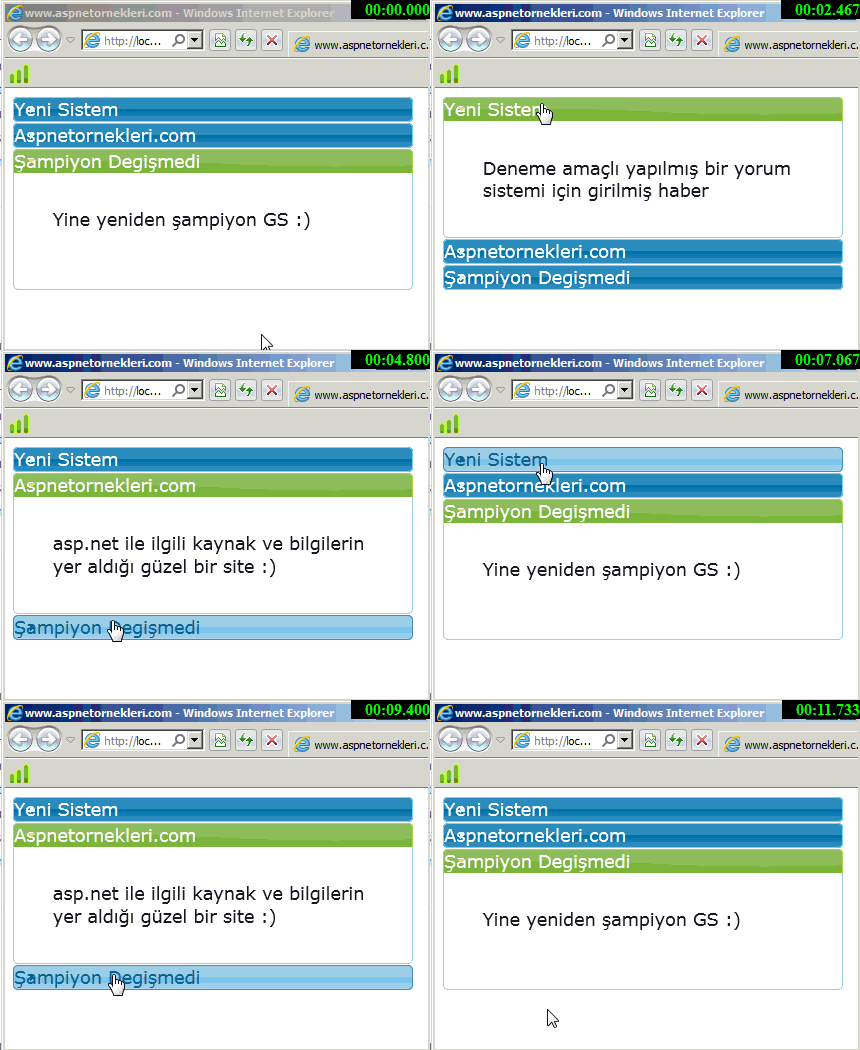
Asp.Net jQuery Accordion İçerik Uygulaması
Asp.net ile jQuery Accordion uygulamasını yapacağız. Uygulamamızda bilgileri veri tabanından okuyup jQuery Accordion ile ekranda görüntüleyeceğiz ilk olarak aşağıdaki özelliklerde bir veri tabanı oluşturup App_Data klasörü içine atıyoruz
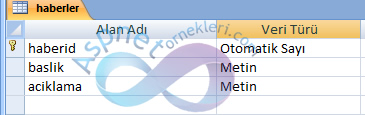
Şimdi sayfamıza içeriği görüntülemek için bir Repeater ekliyoruz jQuery Accordion stil ve Javascript dosyalarını da http://ajax.googleapis.com/ajax/libs/jquery/1.7.2/jquery.min.js , http://ajax.aspnetcdn.com/ajax/jquery.ui/1.8.9/jquery-ui.js , http://ajax.aspnetcdn.com/ajax/jquery.ui/1.8.9/themes/start/jquery-ui.css ekleyerek projemize dahil ediyoruz..
<html xmlns="http://www.w3.org/1999/xhtml">
<head runat="server">
    <title>www.aspnetornekleri.com</title>
</head>
<body>
    <form id="form1" runat="server">
        <script type="text/javascript" src="http://ajax.googleapis.com/ajax/libs/jquery/1.7.2/jquery.min.js"></script>
<script src="http://ajax.aspnetcdn.com/ajax/jquery.ui/1.8.9/jquery-ui.js" type="text/javascript"></script>
<link href="http://ajax.aspnetcdn.com/ajax/jquery.ui/1.8.9/themes/start/jquery-ui.css"
    rel="stylesheet" type="text/css" />
<script type="text/javascript">
    $(function () {
        $("#habergoster").accordion();
    });
</script>
<div id="habergoster" style = "width:400px">
    <asp:Repeater ID="haberlistesi" runat="server">
        <ItemTemplate>
            <h3>
                <%# Eval("baslik") %></h3>
            <div>
                <p>
                    <%# Eval("aciklama") %>
                </p>
            </div>
        </ItemTemplate>
    </asp:Repeater>
</div>
   <!-- www.aspnetornekleri.com -->
    </form>
</body>
</html>
Repeater içeriğini doldurmak için veri tabanı bağlantısı ve sorgu için kullanacağımız kodlar
 protected void Page_Load(object sender, EventArgs e)
        {
            if (!this.IsPostBack)
            {
                this.icerikdoldur();
            }
        }
        private void icerikdoldur()
        {
            OleDbConnection baglanti = new OleDbConnection("Provider=Microsoft.ACE.OLEDB.12.0; DATA Source=" + Server.MapPath("App_Data/haber.accdb"));
            baglanti.Open();
            //www.aspnetornekleri.com
            OleDbCommand komut = new OleDbCommand("Select baslik,aciklama from haberler", baglanti);
            haberlistesi.DataSource = komut.ExecuteReader();
            haberlistesi.DataBind();
            baglanti.Close();
        }
kodlarımızın çalışabilmesi için using System.Data; using System.Data.OleDb; namespacelerini ekliyoruz
ve sonuç